Showing posts with label Tugas Jarkom. Show all posts

Membangun Inter-VLAN dengan Packet Tracer

Pada Posting kali ini saya ingin sedikit berbagi ilmu bagaimana membangun jaringan Inter-VLAN dengan packet tracer 5.3 (saya sarankan menggunakan packet tracer 5.3 ke atas karena kita akan menyetting 2 switch dengan mode trunk dan encapsulation dot1q) dengan ketentuan seperti di bawah ini :


1. Siapkan alat dan bahannya (tersedia di packet tracer)
>> 1 bh Router (router-PT)
>>  2 bh Switch (3560). Misalkan Switch2 dan Switch3.
>> 4 bh pc client dan atur agar 1 bh switch mempunyai 2 pc client.
2. Hubungkan @ PC client ke switch dengan kabel stright.
3. Hubungkan 2 bh switch dengan kabel cross
4. Hubungkan 1 bh router dengan switch dengan kabel straight.
5. Setting Switch2 sbb :

Switch>ena
Switch#
Switch#conf
Switch#configure ter
Switch#configure terminal 
Enter configuration commands, one per line.  End with CNTL/Z.
Switch(config)#vlan 10
Switch(config-vlan)#name dosen
Switch(config-vlan)#exit
Switch(config)#vlan 20
Switch(config-vlan)#name mahasiswa
Switch(config-vlan)#exit
Switch(config)#int fa
Switch(config)#int fastEthernet 0/1
Switch(config-if)#swi
Switch(config-if)#switchport acc
Switch(config-if)#switchport access vlan
Switch(config-if)#switchport access vlan 10
Switch(config-if)#exit
Switch(config)#int fastEthernet 0/2
Switch(config-if)#sw
Switch(config-if)#switchport acc
Switch(config-if)#switchport access vl
Switch(config-if)#switchport access vlan 20
Switch(config-if)#exit
Switch(config)#int
Switch(config)#interface fa
Switch(config)#interface fastEthernet 0/3
Switch(config-if)#swi
Switch(config-if)#switchport mod
Switch(config-if)#switchport mode tr
Switch(config-if)#switchport mode trunk 
Switch(config-if)#switchport trunk encapsulation dot1q 
Switch(config-if)#exit
Switch(config)#int fa
Switch(config)#int fastEthernet 0/4
Switch(config-if)#swi
Switch(config-if)#switchport mo
Switch(config-if)#switchport mode tr
Switch(config-if)#switchport mode trunk 
Switch(config-if)#exit
Switch(config)#
Switch#
%SYS-5-CONFIG_I: Configured from console by console

Switch#show running-config 
Building configuration...

Current configuration : 1205 bytes
!
version 12.2
no service timestamps log datetime msec
no service timestamps debug datetime msec
no service password-encryption
!
hostname Switch
!
!
!
!
!
!
!
!
!
!
!
!
!
!
spanning-tree mode pvst
!
!
!
!
interface FastEthernet0/1
 switchport access vlan 10
!
interface FastEthernet0/2
 switchport access vlan 20
!
interface FastEthernet0/3
 switchport trunk encapsulation dot1q
 switchport mode trunk
!
interface FastEthernet0/4
 switchport mode trunk
!


  6. Setting switch3 sbb :

Switch>ena
Switch#conf
Switch#configure ter
Switch#configure terminal 
Enter configuration commands, one per line.  End with CNTL/Z.
Switch(config)#vlan 10
Switch(config-vlan)#name
Switch(config-vlan)#name dosen
Switch(config-vlan)#exit
Switch(config)#vlan
Switch(config)#vlan 20
Switch(config-vlan)#name mahasiswa
Switch(config-vlan)#exit
Switch(config)#int
Switch(config)#interface fa
Switch(config)#interface fastEthernet 0/1
Switch(config-if)#swi
Switch(config-if)#switchport acc
Switch(config-if)#switchport access vlan 10
Switch(config-if)#exit
Switch(config)#interface fastEthernet 0/2
Switch(config-if)#switchport access vlan 20
Switch(config-if)#exit

Switch(config)#interface fastEthernet 0/3
Switch(config-if)#swi
Switch(config-if)#switchport mod
Switch(config-if)#switchport mode tr
Switch(config-if)#switchport mode trunk 
Switch(config-if)#switchport trunk encapsulation dot1q 
Switch(config-if)#exit

Switch(config)#sh
Switch(config)#
Switch#
%SYS-5-CONFIG_I: Configured from console by consolesh
Switch#show ru
Switch#show running-config 
Building configuration...

Current configuration : 1024 bytes
!
version 12.1
no service timestamps log datetime msec
no service timestamps debug datetime msec
no service password-encryption
!
hostname Switch
!
!
!
interface FastEthernet0/1
 switchport access vlan 10
!
interface FastEthernet0/2
 switchport access vlan 20
!
interface FastEthernet0/3
 switchport trunk encapsulation dot1q
 switchport mode trunk
!

7. Setting Routernya sbb :

Router>en
Router>enable 
Router#con
Router#conf
Router#configure ter
Router#configure terminal 
Enter configuration commands, one per line.  End with CNTL/Z.
Router(config)#int
Router(config)#interface fa
Router(config)#interface fastEthernet 0/0
Router(config-if)#no
Router(config-if)#no ip
Router(config-if)#no ip add
Router(config-if)#no ip address 
Router(config-if)#no
Router(config-if)#no shu
Router(config-if)#no shutdown 
Router(config-if)#exit
Router(config)#int
Router(config)#interface fa
Router(config)#interface fastEthernet 0/0.10
Router(config-subif)#en
Router(config-subif)#encapsulation do
Router(config-subif)#encapsulation dot1Q 
% Incomplete command.
Router(config-subif)#encapsulation dot1Q 10
Router(config-subif)#ip
Router(config-subif)#ip add
Router(config-subif)#ip address 192.168.10.1 255.255.255.0
Router(config-subif)#exit
Router(config)#int
Router(config)#interface fa
Router(config)#interface fastEthernet 0/0.20
Router(config-subif)#en
Router(config-subif)#encapsulation do
Router(config-subif)#encapsulation dot1Q 20
Router(config-subif)#ip
Router(config-subif)#ip add
Router(config-subif)#ip address 192.168.20.1 255.255.255.0
Router(config-subif)#exit
Router(config)#int
Router(config)#interface fa
Router(config)#interface fastEthernet 0/0.1
Router(config-subif)#ip
Router(config-subif)#ip add
Router(config-subif)#ip address 192.168.1.1 255.255.255.0
Router(config-subif)#exit


Pengujian :

1. pc 0 ping ke gateway nya dan pc 4 dan hasilnya reply.


2. pc 2 ping ke gateway nya dan pc 4 dan hasilnya reply.
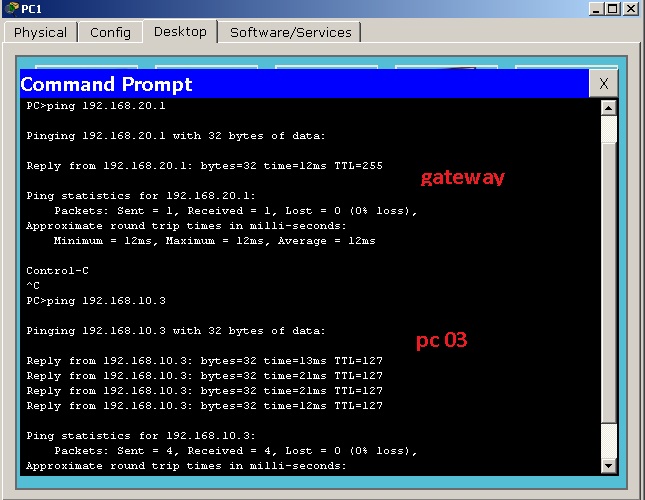


Nama : M. Bariq
NIM : 11.240.0037
Kelas : 4M41
Read more

PERINTAH DASAR ROUTER


PERINTAH DASAR ROUTER
Perintah penuh
Perintah singkat
Maksud Perintah
show running-config
sh ru
Menampilkan konfigurasi yang sedang berjalan di RAM. Termasuk host name, passwords, interface IP addresses, routing protocol yang aktif, DHCP dan konfigurasi NAT. Dapat dijalankan di EXEC mode.
show startup-config
Sh st
Menampilkan isi file konfigurasi yang tersimpan di NVRAM,Mulai dariHost Name, Passwords, Interface IP Addresses, Routing Protocol yang aktif, DHCP dan konfigurasi NAT.
Show version
Sh v
Menampilkan informasi tentang versi software yang sekarang sedang jalan lengkap dengan informasi hardware dan devicenya.
show ip protocols
Sh ip p
Memperlihatkan ip protokol routing yang telah dikonfigurasi dan sedang berjalan, 
Digunakan untuk menampilkan status interface IP,baik secara global maupun khusus dari protokol yang terkonfigurasi pada saat ini (konfigurasi IP awal).
show ip route
Sh ip ro
Memperlihatkan konfigurasi routing,
Digunakan untuk menampilkan konfirmasi pada Router yang telah di authentikasi oleh Router lain dan telah mampu memperoleh rute dari Router lainnya, selain itu juga digunakan untuk mengetahui konfigurasi IP yang dilakukan baik secara global maupun secara khusus dari IYN. Yang meliputi configurasi IP  pada FastEthernet0/0 maupun pada IP Serial2/0
show interfaces
Sh in
Menunjukkan interface yg berjalan di router,
Digunakan untuk menampilkan statistic semua interface IYN mulai dari FastEthernet dan Serial. Untuk menampilkan statistic interface tertentu, menggunakan perintah show interfaces diikuti dengan nomor port/slot interface.
show ip interface brief
Sh ip i b
Tinjauan semua antarmuka pada router,
Digunakan untuk menampilkan Konfigurasi pada interface yang terhubung pada IYN. Mulai dari konfigurasi yang sedang berjalan maupun yang konfigurasi yang tidak berjalan (belum terkonfigurasi). Pada perintah ini kita dibawa untuk mengetahui : Interface, IP-Address, Method, Status, Protocol
show protocols
Sh prot
menampilkan status interface baik secara global maupun khusus dari protokol layer 3 yang terkonfigurasi.
show cdp neighbors
Sh cd ne
Menampilkan ringkasan cdp perangkat tersambung,
Digunakan untuk mengetahui Capability Codes, yang meliputi : R (IYN), T (Trans Bridge), B (Source Route Bridge), S (Switch), H (Host), I (IGMP), r (Repeater), P (Phone). Selain itu juga digunakan untuk mengetahui Device ID diantaranya : Local Intrfce, Holdtme, Capability, Platform, Port ID
show sessions
Sh se
Memperlihatkan sesi yang ada sekarang
Digunakan untuk mengetahui koneksi yang sedang berjalan (koneksi yang di buka)
show ssh
Sh ss
Menampilkan operasi status pengoperasian SSH
Digunakan untuk melakukan koneksi dengan server SSHv2 dan SSHv1
Ping
P
Digunakan untuk melakukan / melihat koneksi antar jaringan yang sedang berhubungan. Perintah ping harus diikuti address or hostname. Contoh ; ping 192.168.1.1, 
Memastikan apakah suatu komputer tertentu dalam suatu jaringan atau internet itu ada dan terhubung.
Traceroute
tr
Menunjukkan rute yang dilewati paket untuk mencapai tujuan. Ini dilakukan dengan mengirim pesan Internet Control Message Protocol (ICMP) Echo Request Ke tujuan dengan nilai Time to Live yang semakin meningkat. 


Penggunaan perintah dasar router di Packet Tracer 5.2


Perintah
Hasil
BariQ_92#show running-config
Building configuration...

Current configuration : 691 bytes
!
version 12.2
no service timestamps log datetime msec
no service timestamps debug datetime msec
no service password-encryption
!
hostname BariQ_92

interface FastEthernet0/0
 ip address 192.168.1.1 255.255.255.0
 duplex auto
 speed auto
!
interface FastEthernet1/0
 no ip address
 duplex auto
 speed auto
 shutdown
!
interface Serial2/0
 ip address 192.168.2.1 255.255.255.0
 clock rate 64000
!
interface Serial3/0
 no ip address
 shutdown
!
interface FastEthernet4/0
 no ip address
 shutdown
!
interface FastEthernet5/0
 no ip address
 shutdown
!
ip classless
ip route 0.0.0.0 0.0.0.0 192.168.2.2
line con 0
line vty 0 4
 login
!
end
BariQ_92#show startup-config
startup-config is not present
BariQ_92#show version
Cisco Internetwork Operating System Software
IOS (tm) PT1000 Software (PT1000-I-M), Version 12.2(28), RELEASE SOFTWARE (fc5)
Technical Support: http://www.cisco.com/techsupport
Copyright (c) 1986-2005 by cisco Systems, Inc.
Compiled Wed 27-Apr-04 19:01 by miwang
Image text-base: 0x8000808C, data-base: 0x80A1FECC

ROM: System Bootstrap, Version 12.1(3r)T2, RELEASE SOFTWARE (fc1)
Copyright (c) 2000 by cisco Systems, Inc.
ROM: PT1000 Software (PT1000-I-M), Version 12.2(28), RELEASE SOFTWARE (fc5)

System returned to ROM by reload
System image file is "flash:pt1000-i-mz.122-28.bin"

PT 1001 (PTSC2005) processor (revision 0x200) with 60416K/5120K bytes of memory
.
Processor board ID PT0123 (0123)
PT2005 processor: part number 0, mask 01
Bridging software.
X.25 software, Version 3.0.0.
4 FastEthernet/IEEE 802.3 interface(s)
2 Low-speed serial(sync/async) network interface(s)
32K bytes of non-volatile configuration memory.
63488K bytes of ATA CompactFlash (Read/Write)

Configuration register is 0x2102
BariQ_92#show ip protocols
BariQ_92#show ip route
Codes: C - connected, S - static, I - IGRP, R - RIP, M - mobile, B - BGP
       D - EIGRP, EX - EIGRP external, O - OSPF, IA - OSPF inter area
       N1 - OSPF NSSA external type 1, N2 - OSPF NSSA external type 2
       E1 - OSPF external type 1, E2 - OSPF external type 2, E - EGP
       i - IS-IS, L1 - IS-IS level-1, L2 - IS-IS level-2, ia - IS-IS inter area
       * - candidate default, U - per-user static route, o - ODR
       P - periodic downloaded static route

Gateway of last resort is 192.168.2.2 to network 0.0.0.0

C    192.168.1.0/24 is directly connected, FastEthernet0/0
C    192.168.2.0/24 is directly connected, Serial2/0
S*   0.0.0.0/0 [1/0] via 192.168.2.2
BariQ_92#show interfaces
FastEthernet0/0 is up, line protocol is up (connected)
  Hardware is Lance, address is 0090.2b2c.6c1d (bia 0090.2b2c.6c1d)
  Internet address is 192.168.1.1/24
  MTU 1500 bytes, BW 100000 Kbit, DLY 100 usec,
     reliability 255/255, txload 1/255, rxload 1/255
  Encapsulation ARPA, loopback not set
  ARP type: ARPA, ARP Timeout 04:00:00,
  Last input 00:00:08, output 00:00:05, output hang never
  Last clearing of "show interface" counters never
  Input queue: 0/75/0 (size/max/drops); Total output drops: 0
  Queueing strategy: fifo
  Output queue :0/40 (size/max)
  5 minute input rate 0 bits/sec, 0 packets/sec
  5 minute output rate 0 bits/sec, 0 packets/sec
     0 packets input, 0 bytes, 0 no buffer
     Received 0 broadcasts, 0 runts, 0 giants, 0 throttles
     0 input errors, 0 CRC, 0 frame, 0 overrun, 0 ignored, 0 abort
     0 input packets with dribble condition detected
     0 packets output, 0 bytes, 0 underruns
     0 output errors, 0 collisions, 0 interface resets
     0 babbles, 0 late collision, 0 deferred
     0 lost carrier, 0 no carrier
     0 output buffer failures, 0 output buffers swapped out
FastEthernet1/0 is administratively down, line protocol is down (disabled)
  Hardware is Lance, address is 000c.cf35.bdd4 (bia 000c.cf35.bdd4)
  MTU 1500 bytes, BW 100000 Kbit, DLY 100 usec,
     reliability 255/255, txload 1/255, rxload 1/255
  Encapsulation ARPA, loopback not set
  ARP type: ARPA, ARP Timeout 04:00:00,
  Last input 00:00:08, output 00:00:05, output hang never
  Last clearing of "show interface" counters never
  Input queue: 0/75/0 (size/max/drops); Total output drops: 0
  Queueing strategy: fifo
  Output queue :0/40 (size/max)
  5 minute input rate 0 bits/sec, 0 packets/sec
  5 minute output rate 0 bits/sec, 0 packets/sec
     0 packets input, 0 bytes, 0 no buffer
     Received 0 broadcasts, 0 runts, 0 giants, 0 throttles
     0 input errors, 0 CRC, 0 frame, 0 overrun, 0 ignored, 0 abort
     0 input packets with dribble condition detected
     0 packets output, 0 bytes, 0 underruns
     0 output errors, 0 collisions, 2 interface resets
     0 babbles, 0 late collision, 0 deferred
     0 lost carrier, 0 no carrier
     0 output buffer failures, 0 output buffers swapped out
Serial2/0 is up, line protocol is up (connected)
  Hardware is HD64570
  Internet address is 192.168.2.1/24
  MTU 1500 bytes, BW 128 Kbit, DLY 20000 usec,
     reliability 255/255, txload 1/255, rxload 1/255
  Encapsulation HDLC, loopback not set, keepalive set (10 sec)
  Last input never, output never, output hang never
  Last clearing of "show interface" counters never
  Input queue: 0/75/0 (size/max/drops); Total output drops: 0
  Queueing strategy: weighted fair
  Output queue: 0/1000/64/0 (size/max total/threshold/drops)
     Conversations  0/0/256 (active/max active/max total)
     Reserved Conversations 0/0 (allocated/max allocated)
     Available Bandwidth 96 kilobits/sec
  5 minute input rate 0 bits/sec, 0 packets/sec
  5 minute output rate 0 bits/sec, 0 packets/sec
     0 packets input, 0 bytes, 0 no buffer
     Received 0 broadcasts, 0 runts, 0 giants, 0 throttles
     0 input errors, 0 CRC, 0 frame, 0 overrun, 0 ignored, 0 abort
     0 packets output, 0 bytes, 0 underruns
     0 output errors, 0 collisions, 0 interface resets
     0 output buffer failures, 0 output buffers swapped out
     0 carrier transitions
     DCD=up  DSR=up  DTR=up  RTS=up  CTS=up
Serial3/0 is administratively down, line protocol   is down (disabled)
  Hardware is HD64570
  MTU 1500 bytes, BW 128 Kbit, DLY 20000 usec,
     reliability 255/255, txload 1/255, rxload 1/255
  Encapsulation HDLC, loopback not set, keepalive set (10 sec)
  Last input never, output never, output hang never
  Last clearing of "show interface" counters never
  Input queue: 0/75/0 (size/max/drops); Total output drops: 0
  Queueing strategy: weighted fair
  Output queue: 0/1000/64/0 (size/max total/threshold/drops)
     Conversations  0/0/256 (active/max active/max total)
     Reserved Conversations 0/0 (allocated/max allocated)
     Available Bandwidth 96 kilobits/sec
  5 minute input rate 0 bits/sec, 0 packets/sec
  5 minute output rate 0 bits/sec, 0 packets/sec
     0 packets input, 0 bytes, 0 no buffer
     Received 0 broadcasts, 0 runts, 0 giants, 0 throttles
     0 input errors, 0 CRC, 0 frame, 0 overrun, 0 ignored, 0 abort
     0 packets output, 0 bytes, 0 underruns
     0 output errors, 0 collisions, 2 interface resets
     0 output buffer failures, 0 output buffers swapped out
     0 carrier transitions
     DCD=down  DSR=down  DTR=down  RTS=down  CTS=down
FastEthernet4/0 is administratively down, line protocol is down (disabled)
  Hardware is Lance, address is 0090.2190.9985 (bia 0090.2190.9985)
  MTU 1500 bytes, BW 100000 Kbit, DLY 100 usec,
     reliability 255/255, txload 1/255, rxload 1/255
  Encapsulation ARPA, loopback not set
  ARP type: ARPA, ARP Timeout 04:00:00,
  Last input 00:00:08, output 00:00:05, output hang never
  Last clearing of "show interface" counters never
  Input queue: 0/75/0 (size/max/drops); Total output drops: 0
  Queueing strategy: fifo
  Output queue :0/40 (size/max)
  5 minute input rate 0 bits/sec, 0 packets/sec
  5 minute output rate 0 bits/sec, 0 packets/sec
     0 packets input, 0 bytes, 0 no buffer
     Received 0 broadcasts, 0 runts, 0 giants, 0 throttles
     0 input errors, 0 CRC, 0 frame, 0 overrun, 0 ignored, 0 abort
     0 input packets with dribble condition detected
     0 packets output, 0 bytes, 0 underruns
     0 output errors, 0 collisions, 2 interface resets
     0 babbles, 0 late collision, 0 deferred
     0 lost carrier, 0 no carrier
     0 output buffer failures, 0 output buffers swapped out
FastEthernet5/0 is administratively down, line protocol is down (disabled)
  Hardware is Lance, address is 0090.219b.3578 (bia 0090.219b.3578)
  MTU 1500 bytes, BW 100000 Kbit, DLY 100 usec,
     reliability 255/255, txload 1/255, rxload 1/255
  Encapsulation ARPA, loopback not set
  ARP type: ARPA, ARP Timeout 04:00:00,
  Last input 00:00:08, output 00:00:05, output hang never
  Last clearing of "show interface" counters never
  Input queue: 0/75/0 (size/max/drops); Total output drops: 0
  Queueing strategy: fifo
  Output queue :0/40 (size/max)
  5 minute input rate 0 bits/sec, 0 packets/sec
  5 minute output rate 0 bits/sec, 0 packets/sec
     0 packets input, 0 bytes, 0 no buffer
     Received 0 broadcasts, 0 runts, 0 giants, 0 throttles
     0 input errors, 0 CRC, 0 frame, 0 overrun, 0 ignored, 0 abort
     0 input packets with dribble condition detected
     0 packets output, 0 bytes, 0 underruns
     0 output errors, 0 collisions, 2 interface resets
     0 babbles, 0 late collision, 0 deferred
     0 lost carrier, 0 no carrier
     0 output buffer failures, 0 output buffers swapped out
BariQ_92#show ip interface brief
Interface              IP-Address      OK? Method Status                Protocol

FastEthernet0/0        192.168.1.1     YES manual up                    up

FastEthernet1/0        unassigned      YES manual administratively down down

Serial2/0              192.168.2.1     YES manual up                    up

Serial3/0              unassigned      YES manual administratively down down

FastEthernet4/0        unassigned      YES manual administratively down down

FastEthernet5/0        unassigned      YES manual administratively down down
BariQ_92#show protocols
Global values:
  Internet Protocol routing is enabled
FastEthernet0/0 is up, line protocol is up
  Internet address is 192.168.1.1/24
FastEthernet1/0 is administratively down, line protocol is down
Serial2/0 is up, line protocol is up
  Internet address is 192.168.2.1/24
Serial3/0 is administratively down, line protocol   is down
FastEthernet4/0 is administratively down, line protocol is down
FastEthernet5/0 is administratively down, line protocol is down
BariQ_92#show cdp neighbors
Capability Codes: R - Router, T - Trans Bridge, B - Source Route Bridge
                  S - Switch, H - Host, I - IGMP, r - Repeater, P - Phone
Device ID    Local Intrfce   Holdtme    Capability   Platform    Port ID
Switch       Fas 0/0          174            S       PT3000      Fas 1/1
Router       Ser 2/0          123            R       PT1000      Ser 2/0
BariQ_92#show sessions
% No connections open
BariQ_92#show ssh
%No SSHv2 server connections running.
%No SSHv1 server connections running.
BariQ_92#ping 192.168.1.1
Type escape sequence to abort.
Sending 5, 100-byte ICMP Echos to 192.168.1.1, timeout is 2 seconds:
!!!!!
Success rate is 100 percent (5/5), round-trip min/avg/max = 4/8/10 ms
BariQ_92#traceroute 192.168.2.2
Type escape sequence to abort.
Tracing the route to 192.168.2.2

  1   192.168.2.2     13 msec   10 msec   20 msec


Gambar Skema Router di Packet Tracer 5.2

Nama : M. Bariq
NIM   : 11.240.0037
Kelas  : 4M41


Read more